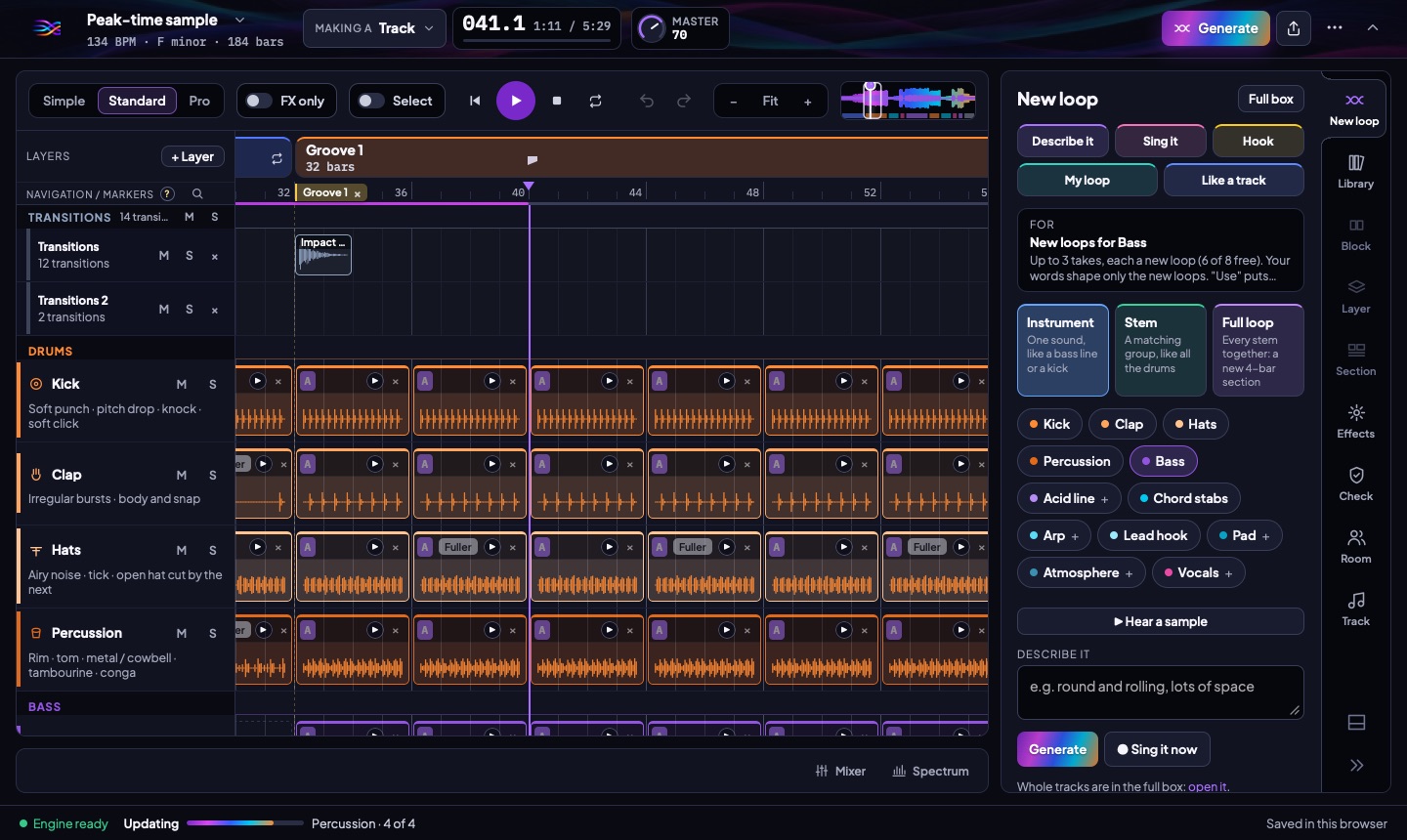
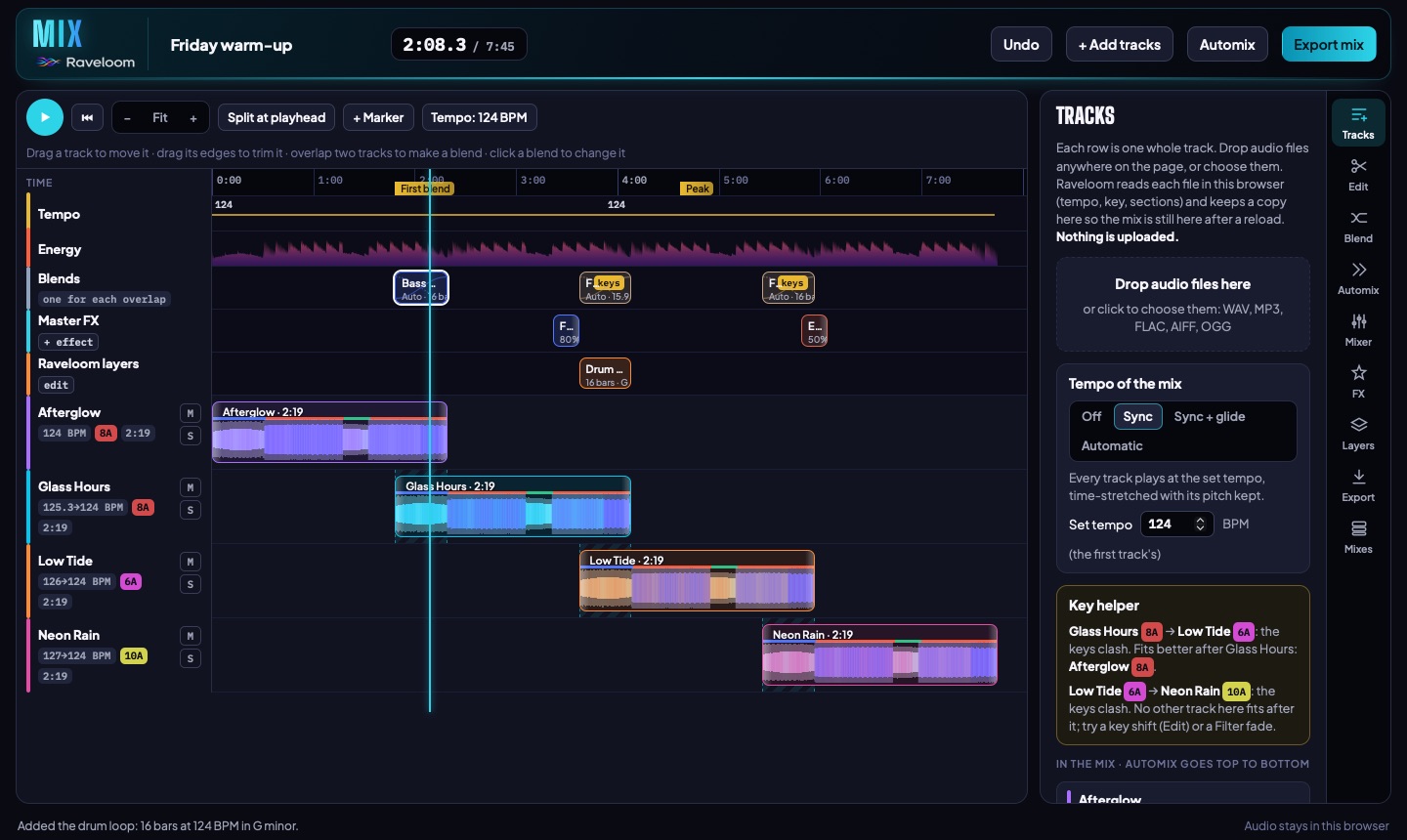
Describe a loop or a track in a few words and get matching loops in one key and tempo. Shape them into a loop pack, or arrange them into a track that is yours.
Try the studio now, no account needed: your work stays in your browser. Accounts, for saving and publishing, are by invitation for now. I have an invite
hypnotic techno, dark, 132 BPM, rolling bassA minor · 132
NormalFullerLighter
Two apps
One to make tracks, one to mix them
Raveloom Studio makes loops and tracks from a few words. Raveloom Mix blends whole tracks into a set. Each is its own app: use one or both.
StudioFor your own tracks
Make loops and tracks from words
A kit from a few wordsMatching loops in one key and tempo, in 28 genres.
Hum itHum, sing or beatbox a line and get it back as a loop.
Arrange it, with 55 effectsPlace loops on a timeline and draw effects over the bars you want.
Export everythingThe mix, stems, MIDI or a loop pack.
Four steps from an idea to files you can play out. Each takes a few clicks.
Describe. Type a few words about the track you want. You get a matching kit of layers, all in one key and tempo.
Arrange. Place 4-bar clips on the timeline, section by section. Press play to hear it while you build.
Shape. Drag an effect onto a clip. Draw fades and filter sweeps right on the timeline.
Export. Save the mix, the mix plus stems, or MIDI. It all comes in one zip.
How it works
From a few words to your own track
Raveloom gives you the parts. You decide how they come together.
1
Describe your track
Type a few words: genre, mood, speed, sounds. For example “acid techno, raw, 135 BPM, squelchy”.
2
Get a matching kit
Layers in one key and tempo. Each layer holds up to eight loops, and each loop has three versions.
LighterNormalFuller
3
Arrange it
Place 4-bar clips on a timeline. Add sections, FX, fades and cuts until it sounds right to you.
4
Export
Save a WAV mix, the mix plus stems, MIDI, or a loop pack. Each comes as a zip.
Why a loom
Separate threads, woven into one track
A loom weaves separate threads into one piece of cloth. Each thread keeps its own colour, and you can pull it out again.
Raveloom works the same way. Drums, bass, melody and vocals are separate layers. You weave them into one track, and any of them comes out again as a stem whenever you need it.
Four instrument threads weave over and under each other into one track; the vocals come out again as a stem, then go back in.
More ways to start
Sing it
Hum the idea in your head
Hum, sing or beatbox up to 32 bars. Raveloom finds the notes and the rhythm and turns them into loops: a new track built around your idea, or one part of the track you have open.
Live from your microphone, or from a recording
Notes are snapped to the beat and the key
Worked out in your browser
Hum a line. The notes snap to the beat and the key, then become a loop on a layer.
Your browser reads the speed, key, sections and groove, then fills in the Generate box. Nothing is uploaded and no notes are copied.
Start from a track you like
Begin with the feel of a track you love
Choose a track and Raveloom reads its speed, key, sections, groove and sound, then fills in the Generate box for you.
Read in your browser: nothing is uploaded
No notes or sounds are copied
You get your own kit with a similar feel
Effects
Effects built in
55 effects in eight groups. Put one on any layer, or on the whole mix, over the bars you choose. Effects can overlap on the same bars, and ★ keeps your favourites at the top of the menu.
Hear them all in the Effects tour, a sample project that plays the 55 effects plus fades, filter sweeps, transitions and ready-made moves in turn.
Essentials
EchoRepeats in time with the track
Ping-pongEchoes that bounce left and right
ReverbAdds space and a tail
GateChops the sound in rhythm
FlangerA slow, sweeping whoosh
RollRepeats a short slice
CrushAdds grit and wobble
Echo & reverbDub echo, Tape echo, Big hallMovementPhaser, Auto pan, TremoloCut & pumpSidechain pump, Slice gateFilterBand-pass sweep, Soft lo-fiTricksVinyl brake, Stutter, Record scratchNoise & hitsNoise sweep, Claps on 2 and 4HardDrive, Fuzz, for hard techno
Throws, build-ups, endings
One pick places a DJ move: Echo out, Wash out or Sweep up, a Rocket or Lift into the drop, a Landing or Cooldown out of it.
Fades and filter sweeps
Draw a fade or a sweep on any layer or on the whole mix, over as many bars as you need.
Transitions placed for you
Risers, downlifters, crashes, build rolls and impacts land where sections change, on their own track. Move, overlap or remove any of them.
A mixer by stem
Faders, pan and filter knobs and meters for every layer, grouped by stem. The Master sets the track's loudness: Club loud, Club, Streaming or Peak only.
Ready-made projects that open in the studio, so you can hear what it does and change anything. Best on headphones: phone speakers hide the kick and bass. You'll need your invite to open the studio.
Start with one sound, a group of sounds or a full loop. Raveloom keeps every take, so nothing you make is lost.
Loop mode
One loop of 4 to 32 bars, with tools made for loops: focus on one layer, check that the end flows into the start, and grow it into a track when you're ready.
Generate keeps both
Ask for a new instrument, stem, full loop or track. Your new take sits next to what you had, up to eight loops on a layer, and you pick the one you like.
Your loop library
Every take, loop, stem, full loop and track you make is kept with its name and your words. Filter it, rename, archive, and drop anything back into a track.
Start empty
Begin with nothing and add one part at a time, then let Fill the rest make the parts you haven't made yet.
Loop packs and the Raveloom Market
Make loops other producers want
Turn a loop into a pack that's ready to share: every variation, other keys and speeds, each layer on its own, a preview and a licence in plain words. We're building the Raveloom Market, where producers sell and buy loops and packs made in Raveloom, right inside the studio.
01
A pack in one click
Export pack makes the loop in Lighter, Normal and Fuller, with fills and evolving takes, in other keys and speeds, plus every layer as its own file and a short preview.
02
Your licence, your terms
Keep a loop for yourself, or share it free with credit to you, or free for non-commercial music. The pack carries the licence and the credit line.
03
Sell to other producers
The Market adds paid licences: Standard, Pro for sync and client work, and Exclusive. Early-access members help shape it.
A few of the tools that help a track sound right, and get made with friends.
Your words as a vocal hook
Press Hook and type a word or a short phrase. Raveloom's voice speaks it, and the studio cuts it into syllables, tunes them to the key and repeats them on the beat. Pick one of 15 voices and six styles.
Groove dial
Straight, Swung, Rolling or Loose, in Track settings under Tempo. It moves the drums and bass together; the kick stays put.
Check my track, and Hear it on
Check my track lists problems in plain words, with a fix where it's safe. At the top of the Check tab, hear your track as a laptop, a phone or a club would play it. Exports always get the full studio sound.
Live room
Start a room and share the link. Up to 4 people edit the same track. The Room tab shows where everyone is playing, lets you follow someone, pin notes to bars and see what changed.
A kit picks the layers that fit your words. Colours match the studio, so you can read a timeline at a glance.
Drums
Kick
Clap
Hats
Percussion
Bass
Bass
Acid line
Melody
Chord stabs
Arp
Lead hook
Pad
Atmosphere
Vocals
Vocals
FX
Riser
Impact
Ready-made sounds for every layer. Open Sounds on a layer, listen to the choices and pick one. Or take a loop from Raveloom's own free loops in the Library.
Made in-house
Every sound is made by Raveloom's own code
Raveloom builds each sound from scratch with synthesis. No outside AI company sees your music.
Synthesis, not samples
Kicks, basses, pads and FX are built from oscillators, noise and filters every time you make a kit.
An AI voice on our servers
Vocals are spoken by an AI voice model that runs on our own servers, so your words never go to another company.
Our own music AI
We are building Raveloom's own music AI models. They will learn only from sounds our engine makes, so what you make stays clean to release. Early-access members try them first.
Clean and consistent
Every layer is made in the same key and tempo, so the parts fit together.
Genres
28 genres, from techno to drum & bass
Each one has its own beats, bass lines, sounds and arrangement. Pick a genre to read how it's made and start one in the studio.
Explore
Hear what others made in Raveloom
Listen to tracks people made in Raveloom, like them, and open them in the studio to make your own version. Press Publish in the studio to share yours there. Tracks on Explore are for listening only: nobody can download them.
Today Raveloom runs in the web browser on your computer, with nothing to install. We're building apps for Mac and Windows, and for iPhone and Android, so you can start an idea anywhere and finish it at your desk. Your tracks are saved with your account, so they will be the same in every app.
Mac
The full studio as an app on your computer.
Windows
The full studio as an app on your computer.
iPhone
Start ideas on the go, then finish them on your computer.
Android
Start ideas on the go, then finish them on your computer.
Your next track starts with a few words
Raveloom is open by invitation. Ask for one, and we'll let you in with the next small group of DJs and producers.